Beginner’s Guide to Domains, DNS, and Hosting
If you are new to websites, words like domain, DNS, and hosting can seem confusing. But once you understand the basics, they are actually easy to follow. This guide explains each one in simple language so you can see how they work together.
What Is a Domain Name
A domain name is the address people type into a browser to visit your website.
Examples include:
yourwebsite.com
mybusiness.net
Instead of remembering a string of numbers called an IP address, people can just use a simple name.
A domain name is your website’s identity. It should be easy to remember and should match your brand. You can think of it like your home address because it tells people where to find you.
What Is Web Hosting
Web hosting is where your website lives online. It is a service that stores your website files, such as text, images, and code, on a server.
When someone types your domain name, hosting is what sends your website to their screen.
There are different types of hosting:
- Shared hosting, where many websites use the same server.
- VPS hosting, which gives you more control and resources.
- Dedicated hosting, where one website uses the whole server.
- Cloud hosting, which uses multiple servers and can grow more easily.
You can think of hosting as the house where your website lives.
What Is DNS
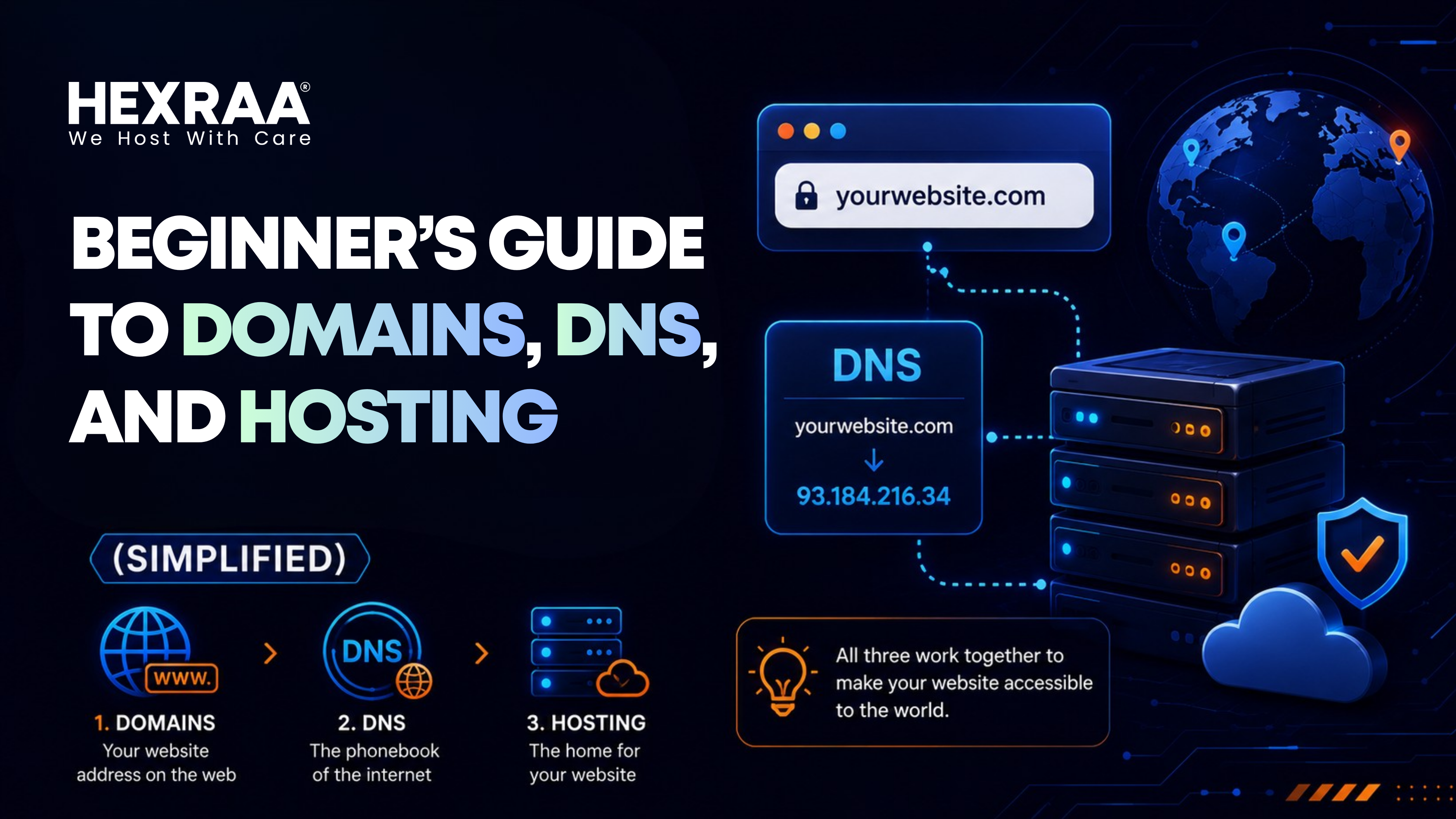
DNS stands for Domain Name System. It connects your domain name to your hosting server.
When someone enters your domain name, DNS finds the correct IP address, sends the request to the right server, and helps the website load.
A simple way to remember it is:
Domain = website name
Hosting = website files
DNS = the system that connects them
How They Work Together
Here is the basic process:
- A visitor types your domain name into a browser.
- DNS finds the IP address linked to that domain.
- The request goes to your hosting server.
- The server sends back your website files.
- The browser shows the website.
This all happens in just a few seconds.
How to Buy a Domain Name
Buying a domain is usually the first step.
Here is how it works:
- Choose a domain name.
- Check if it is available.
- Register it through a domain registrar.
- Pay a yearly fee.
When choosing a domain, keep it short, simple, and easy to spell. Avoid numbers and hyphens if possible. Try to use a good extension like .com, .net, or .org.
What Is a Domain Registrar
A domain registrar is a company that sells domain names.
It handles registration, renewals, and ownership records. You do not own a domain forever. You rent it and renew it each year.
How DNS Works
DNS is easier to understand if you compare it to looking up a phone number.
You know a person’s name, and your phone finds the number. DNS works the same way. You type a domain name, and DNS finds the matching IP address.
Common DNS records include:
- A record, which points your domain to an IP address.
- CNAME record, which connects one domain to another domain.
- MX record, which handles email routing.
What Is a Nameserver
Nameservers are part of DNS. They tell your domain where to look for your website.
When you buy hosting, your provider gives you nameservers such as:
ns1.hosting.com
ns2.hosting.com
You add these to your domain settings so your domain connects to your hosting account.
How to Connect Domain and Hosting
Here is the simple setup process:
- Buy a domain.
- Buy hosting.
- Get the nameservers from your hosting provider.
- Add those nameservers to your domain account.
- Wait for DNS changes to update.
After that, your domain will point to your website.
What Is DNS Propagation
DNS propagation is the time it takes for DNS changes to spread across the internet.
After you update nameservers or DNS settings, some people may still see the old version of your site while others see the new one. This usually takes from a few minutes to 24 hours.
Common Beginner Mistakes
A few common mistakes can cause problems:
- Choosing a hard-to-spell domain.
- Forgetting to renew the domain on time.
- Using poor hosting that is slow or unreliable.
- Setting DNS incorrectly.
Simple Tips for Beginners
- Start with shared hosting if you are new.
- Keep your domain and hosting login details safe.
- Choose a reliable provider.
- Back up your website regularly.
- Learn the basics of DNS so you can solve simple issues on your own.
Why This Matters
Even if you are not a developer, knowing the basics helps you manage your website with more confidence.
It also helps you fix problems faster, talk to developers more clearly, and avoid expensive mistakes.
Final Thoughts
Domains, DNS, and hosting may sound technical, but they are just different parts of the same system that makes your website visible online. A domain is your website name, hosting is where your website lives, and DNS is what connects them.
Once you understand these basics, managing a website becomes much easier.
FAQs
What is the difference between a domain and hosting
A domain is your website address. Hosting is where your website files are stored.
Can I buy a domain and hosting from different companies
Yes. You just need to connect them using DNS settings.
How much does a domain cost
Most domains cost about $10 to $20 per year, depending on the extension.
Do I need hosting to have a domain
Yes. A domain alone is not enough to show a website.
What happens if my domain expires
Your website can go offline, and you may lose the domain if you do not renew it.
How long does DNS propagation take
It usually takes from a few minutes to 24 hours.
What is the easiest hosting for beginners
Shared hosting is usually the easiest and most affordable option.
Can I change my hosting later
Yes, you can switch hosting providers anytime.
What is an IP address
It is a unique number that identifies a server on the internet.
Is DNS hard to manage
No. Basic DNS settings are easy to learn with a little practice.