What Happens During a Cyber Attack and How to Protect Your Website
In today’s digital world, websites aren’t just online brochures. They represent your brand, customer relationships, and business data. Unfortunately, that also makes them attractive targets for cybercriminals. Whether you manage a small blog or a large online store, knowing how cyber attacks unfold is the key to keep your website secure.
This guide explains what really happens during a cyber attack, the different types you might face, and practical ways to protect your site.
What Is a Cyber Attack?
A cyber attack is a deliberate attempt to access, disrupt, or steal information from a website, system, or network. Some are simple automated efforts targeting weak passwords, while others involve complex, multi step infiltrations of entire infrastructures.
Many attacks go unnoticed at first. Hackers may gain access quietly and stay hidden for weeks or even months before making their move.
What Happens During a Cyber Attack?
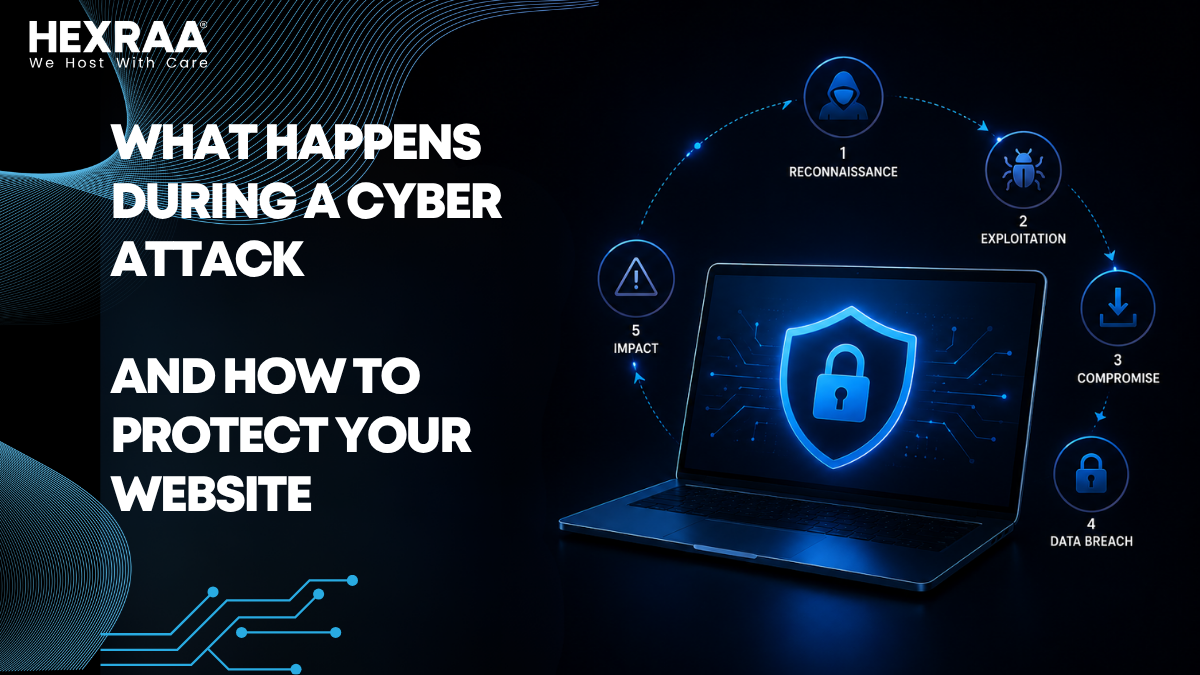
A typical cyber attack happens in several stages. Understanding these can help you spot warning signs early and respond before serious damage occurs.
1. Reconnaissance (Information Gathering)
Before striking, attackers collect details about your website, such as domain information, server type, software version, open ports, and vulnerabilities. They also look for login pages and user roles. Tools that automate scanning help them locate weak points like outdated plugins, unprotected forms, or exposed APIs.
Why it matters: The more information your website reveals, the easier it is for hackers to plan their next move.
2. Initial Access
After finding a weakness, attackers attempt to break in. Common methods include brute force attacks on login pages, exploiting outdated plugins, tricking admins through phishing emails, or injecting harmful code into forms. Even a weak password or missing update can give them entry.
3. Exploitation and Privilege Escalation
Once inside, hackers aim to increase their access by escalating privileges, installing hidden backdoors, and disabling security tools. At this point, they can move freely through your system while staying undetected.
4. Payload Delivery
Next, they carry out their main goal, which could involve injecting malware, stealing customer or payment data, redirecting users to fake pages, or encrypting files in ransomware attacks. This is where the damage becomes visible.
5. Maintaining Access
Skilled attackers make sure they can return later, even after cleanup efforts. They might create new admin accounts, hide malicious scripts, or modify system files so they remain inside your system. Completely removing them can be challenging without a deep scan.
6. Covering Tracks
To avoid detection, attackers delete logs, disguise their IP addresses, and use legitimate-looking processes. This makes forensic investigation and recovery more difficult.
Common Types of Cyber Attacks on Websites
Recognizing common threats will help you prepare effective defenses.
Malware Attacks: Malicious software is added to your site to steal data or disrupt operations.
SQL Injection: Vulnerabilities in databases allow attackers to view or alter sensitive information.
Cross-Site Scripting (XSS): Harmful scripts are injected into web pages, affecting anyone who visits.
Distributed Denial of Service (DDoS): Attackers overload your server with traffic, slowing or crashing your site.
Brute Force Attacks: Automated systems test countless password combinations until they succeed.
Phishing Attacks: Hackers trick users or admins into sharing login information.
Warning Signs of a Cyber Attack
Attacks don’t always announce themselves clearly. Watch for these red flags:
Sudden drops in website performance
Unexpected redirects
Strange or new admin accounts
Altered website content
Browser warnings like “This site may be hacked”
Spikes in traffic that don’t match trends
Catching these signs early can prevent major problems.
How to Protect Your Website from Cyber Attacks
Once you understand how attacks work, you can focus on prevention. Here are straightforward ways to strengthen your website security.
1. Keep Everything Updated
Outdated software is one of the biggest risks.
Update your CMS regularly.
Keep plugins and themes current.
Remove any unused or unsupported extensions.
Tip: Turn on automatic updates whenever possible.
2. Use Strong Passwords and Authentication
Weak passwords make entry easy for hackers.
Create complex and unique credentials.
Enable multi-factor authentication (MFA).
Limit login attempts.
Avoid using the default “admin” username.
3. Install an SSL Certificate
SSL encryption secures the data between your website and users, protects private information, builds trust, and even boosts search rankings. If your website shows HTTPS in the URL, it’s protected.
4. Schedule Regular Backups
Backups are your safety net in case something goes wrong.
Set up automatic backups.
Store them offsite or in the cloud.
Test them occasionally to ensure reliability.
With good backups, you can restore your website quickly after an attack.
5. Use a Web Application Firewall (WAF)
A WAF filters out harmful traffic before it reaches your server.
Blocks known attack patterns.
Protects from injection and DDoS attacks.
Monitors activities in real time.
Think of it as a barrier between your site and potential attackers.
6. Limit User Permissions
It’s wise to restrict access to only what users need.
Assign roles carefully.
Remove inactive accounts.
Avoid giving admin rights to everyone.
Fewer permissions mean fewer ways for hackers to break in.
7. Secure Your Hosting Environment
Choose a host that provides built-in security tools, continuous monitoring, automatic backups, and malware scanning. Cheap hosting often sacrifices these safeguards.
8. Monitor Website Activity
Continuous monitoring helps spot suspicious behavior .
Use reliable security plugins.
Check login attempts and file changes.
Timely detection can keep minor issues from turning into disasters.
9. Protect Against DDoS Attacks
Services like Content Delivery Networks (CDNs), anti-DDoS tools, and rate limiting can help absorb heavy traffic and keep your site running smoothly during attacks.
10. Train Your Team
Human error is often the weakest link in website security.
Educate employees about phishing risks.
Encourage strong password habits.
Set clear security procedures.
Even well designed systems fail without knowledgeable users.
What to Do If Your Website Is Attacked
If your site gets compromised, act fast:
Take your website offline to contain damage.
Identify the source and nature of the attack.
Remove malicious files and hidden backdoors.
Restore a clean backup.
Reset passwords for all accounts.
Update all software and plugins.
Notify affected users if data was exposed.
Consider hiring a cybersecurity professional for a complete cleanup and prevention plan.
Final Thoughts
Cyber attacks are growing more frequent and complex, but most exploit simple vulnerabilities like old software or weak passwords. By understanding how attacks work and applying proactive security measures, you can greatly reduce your risk.
Think of website security as an ongoing effort, not a one-time setup. The more steps you take to secure your site, the harder you make it for attackers—and they’ll likely move on to an easier target.
Protect your website now, because prevention always costs less than recovery.
Frequently Asked Questions (FAQs)
1. What is the most common type of cyber attack on websites?
The most common cyber attacks include malware infections, brute force login attempts, and SQL injection attacks. These methods are widely used because they can be automated and often target common vulnerabilities like weak passwords or outdated software.
2. How do I know if my website has been hacked?
Some common signs include:
Unexpected redirects to other websites
Slow performance or frequent crashes
Unknown user accounts or login activity
Changes in website content
Security warnings from browsers or search engines
If you notice any of these, your website may be compromised.
3. Can small websites be targeted by cyber attacks?
Yes, absolutely. In fact, small websites are often easier targets because they typically have weaker security measures. Many attacks are automated and do not specifically target large businesses they scan for any vulnerable site.
4. How often should I update my website software?
You should update your website software, plugins, and themes as soon as updates are available. Regular updates ensure that known security vulnerabilities are patched quickly.
5. What is a firewall and why do I need one?
A Web Application Firewall (WAF) protects your website by filtering and blocking malicious traffic before it reaches your server. It acts as a protective barrier against common cyber threats like hacking attempts and DDoS attacks.
6. Are free security tools enough to protect my website?
Free tools can provide basic protection, but they may not be sufficient for advanced threats. For better security, consider investing in premium tools or services that offer real time monitoring, advanced threat detection, and dedicated support.
7. How important are backups for website security?
Backups are critical. If your website is attacked, a recent backup allows you to restore your site quickly without losing important data. Always keep multiple backups stored securely.
8. What is two factor authentication (2FA)?
Two-factor authentication adds an extra layer of security by requiring a second form of verification (like a code sent to your phone) in addition to your password. It significantly reduces the risk of unauthorized access.